
ArtCraft Studio
Arrange props and pose a character in a 3D scene, pick a camera angle, then use an image or video model to render the shot.
ArtCraft Team · AI image and video studio · Free download · Optional AI credits · macOS, Windows, Linux · Web
Open sourceFree to try Get ArtCraft StudioLast tested on server
· Ubuntu 24.04 · Studio v0.41.1 (portable) and Chromium
The portable Linux app opened its sign-up screen. In Chromium, opened the 3D editor and created a blank scene with a camera.
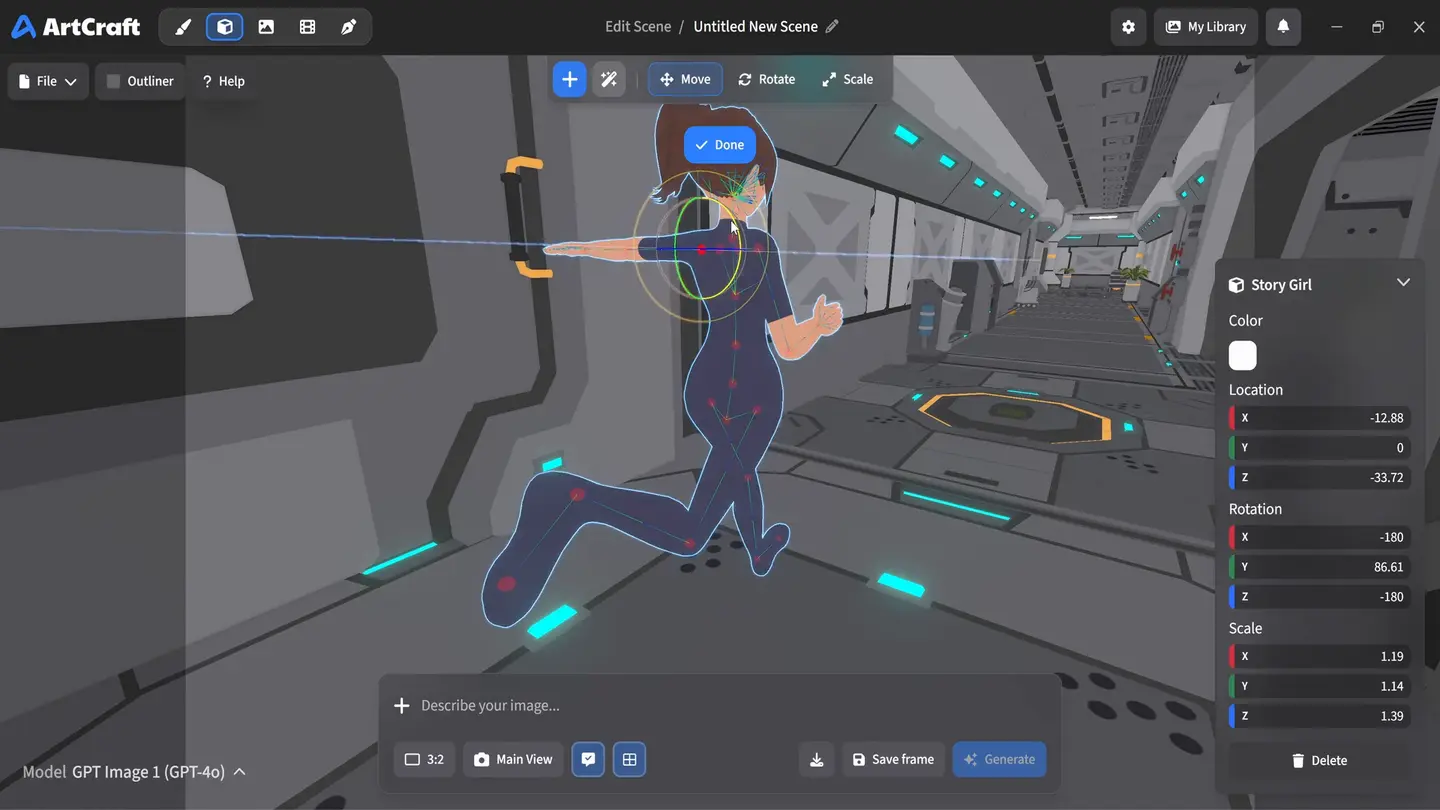
ArtCraft Team · Image credits and license
How to try it
- Open the Studio and choose a 3D scene or bring in an image as a backdrop.
- Place a character or prop and move the camera. Check the model and credit cost before generating a result.
Pricing
ArtCraft Studio is free to download. If you want hosted AI generation, Studio offers one-time credit packs and optional subscriptions. On Nov 23, 2026, promotional US prices were Basic $10/month or $96/year, Pro $35/month or $336/year, and Max $60/month or $576/year. Plans include 1,000, 3,750, or 6,600 credits per month, respectively. Usage depends on the model. Compatible third-party services may charge separately.